Dealing with Supercomputers
Supercomputers are highly heterogeneous infrastructures that can provide non-traditional architectures like:
non-x86 CPUs
accelerators (GPUs, FPGAs)
They might make use of modern multicore and manycore architectures and are built for applications running fast on a large number of resources, having fast node-interconnectivity. They often have different policies from those of HEP Grid Sites:
no internet connectivity
no CVMFS
VPN access
This chapter aims to help administrators to configure DIRAC in order to deal with supercomputers according to their features.
Overview
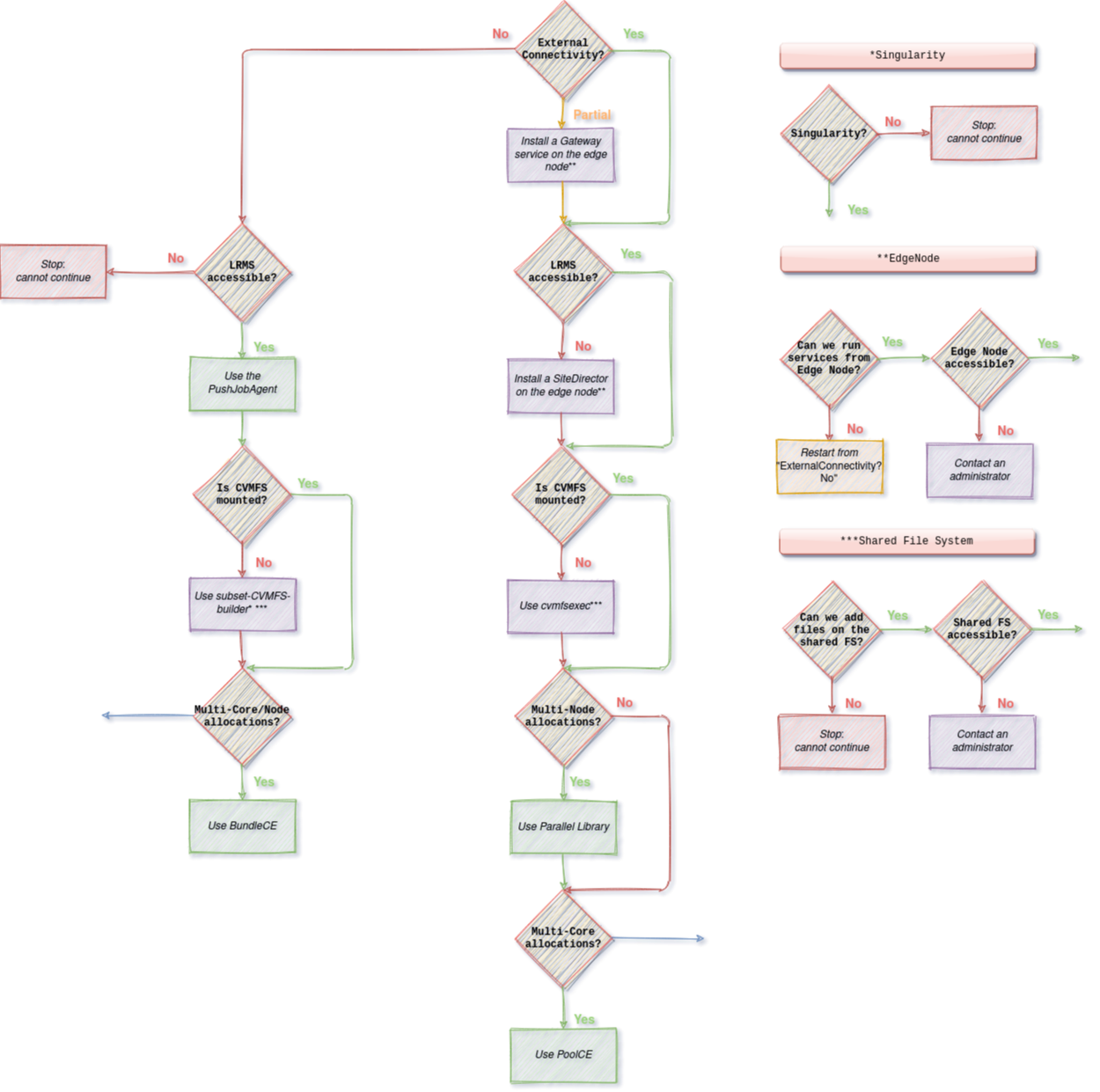
We have identified differences between a traditional HEP grid site and supercomputers. To run workloads on supercomputers, administrators might need to perform and combine several changes. Some can be very easy, such as an update in the CS, while some can require additional actions and analysis such as delivering a subset of CVMFS.
Outbound connectivity
Multi-core allocations
Supercomputers often privilege workloads exploiting many cores in parallel during a short time (HPC). This means they allow a small number of large allocations of resources. Grid applications are usually not adapted: they are embarrassingly parallel, run on a single core for a long period (HTC).
To exploit the manycore nodes of supercomputers and avoid a waste of computing resources, DIRAC can leverage the fat-node partitioning mechanism.
This consists in submitting a Pilot-Job on a node, which can then fetch and run multiple workloads in parallel.
To set it up, one has to add two options in the CE configuration: LocalCEType=Pool and NumberOfProcessors=<N>, N being the number of cores per worker node.
For further details about the CE options, consult the Sites section.
Multi-node allocations
In the same way, some supercomputers have specific partitions only accessible for applications exploiting multiple manycore nodes simultaneously in the same allocation. To exploit the many-node allocations, DIRAC allows to generate one sub-pilot per node allocated. Sub-pilots run in parallel and share the same identifier, output and status.
This option is currently only available via SLURM.
To use sub-pilots in many node allocations, one has to add an additional options in the CE configuration: NumberOfNodes=<min-max>.
For further details about the CE options, consult the Sites section.
CVMFS not available
Workloads having thousands of dependencies are generally delivered via CVMFS on grid sites. By default, CVMFS is not mounted on the nodes of supercomputers. One can talk with the system administrators to discuss the possibility of having it mounted on the worker nodes. If this is not possible, then one has to use cvmfs-exec. It allows mounting CVMFS as an unprivileged user, without the CVMFS package being installed by a system administrator.
This action is purely a VO action: the package has to be installed on the worker node before starting the job. The solution has not been integrated into DIRAC yet.
LRMS not accessible
LRMS, also called Batch System, is the component that orchestrates the worker nodes and the workload on a site. On grid sites, a LRMS is often accessible via a CE, and if a CE is not available, then one can interact directly with it via SSH: DIRAC handles both cases.
Nevertheless, supercomputers have more restrictive access policies than grid sites and may protect the facility access with a VPN.
In this situation, one can run a SiteDirector combined to a LocalComputingElement directly on the edge node of the supercomputer.
This allows submitting pilots from the edge of the supercomputer to the worker nodes directly.
Supercomputers often do not allow users to execute a program from the edge node for a long time. To address this problem, one can call the Site Director in a cron job, executed every N minutes for 1 cycle.
Also, to generate pilot proxies, the Site Director has to rely on a host certificate: one has to contact a system administrator for that.
Only partial outbound connectivity
This case has not been addressed yet.
No outbound connectivity
Submission management
Solutions seen in the previous section cannot work in an environment without external connectivity. The well-known Pilot-Job paradigm on which the DIRAC WMS is based does not apply in these circumstances: the Pilot-Jobs cannot fetch jobs from DIRAC. Thus, such supercomputers require slightly changes in the WMS: we reintroduced the push model.
To leverage the Push model, one has to add the PushJobAgent to the Systems/WorkloadManagement/Agents CS section, such as:
Systems
PushJobAgent_<Name>
{
       # Targeted Sites, CEs and/or type of CEs
       CEs = <CEs>
       Sites = <Sites>
       CETypes = <CETypes>
       # Required to generate a proxy
       VO = <VO>
       # Control the number of jobs handled on the machine
       MaxJobsToSubmit = 100
       Module = PushJobAgent
       # SubmissionPolicy can be "Application" or "JobWrapper"
       # - Application (soon deprecated): the agent will submit a workflow to a PoolCE, the workflow is responsible for interacting with the remote site
       # - JobWrapper (default): the agent will submit a JobWrapper directly to the remote site, it is responsible of the remote execution
       SubmissionPolicy = <SubmissionPolicy>
       # The CVMFS location to be used for the job execution on the remote site
       CVMFSLocation = "/cvmfs/dirac.egi.eu/dirac/pro"
}
One has also to authorize the machine hosting the PushJobAgent to process jobs via the Registry/Hosts/<Host> CS section:
Properties += GenericPilot
Properties += FileCatalogManagement
One has to specify the concerned VO, the platform and the CPU Power in the targeted CEs, such as:
<CE>
{
      # To match a <VO> job
      VO = <VO>
      # Required because we are on a host (not on a worker node)
      VirtualOrganization = <VO>
      # To match compatible jobs
      Platform = <platform>
      Queues
      {
         <Queue>
         {
            CPUNormalizationFactor = <CPU Power value>
         }
      }

}
Finally, one has to make sure that job scheduling parameters are correctly fine-tuned. Further details in the JobScheduling section.
The PushJobAgent class extends the functionality of the JobAgent and operates specifically on a VO box. It follows a similar architecture by retrieving jobs from the MatcherHandler service and submitting them to a ComputingElement. Although PushJobAgent does not inherit directly from the SiteDirector, it incorporates several comparable features, including:
Supervising specific Sites, Computing Elements (CEs), or Queues.
Placing problematic queues on hold and retrying after a pre-defined number of cycles.
The PushJobAgent supports two distinct submission modes: JobWrapper and Application.
JobWrapper Mode (Default and Recommended)
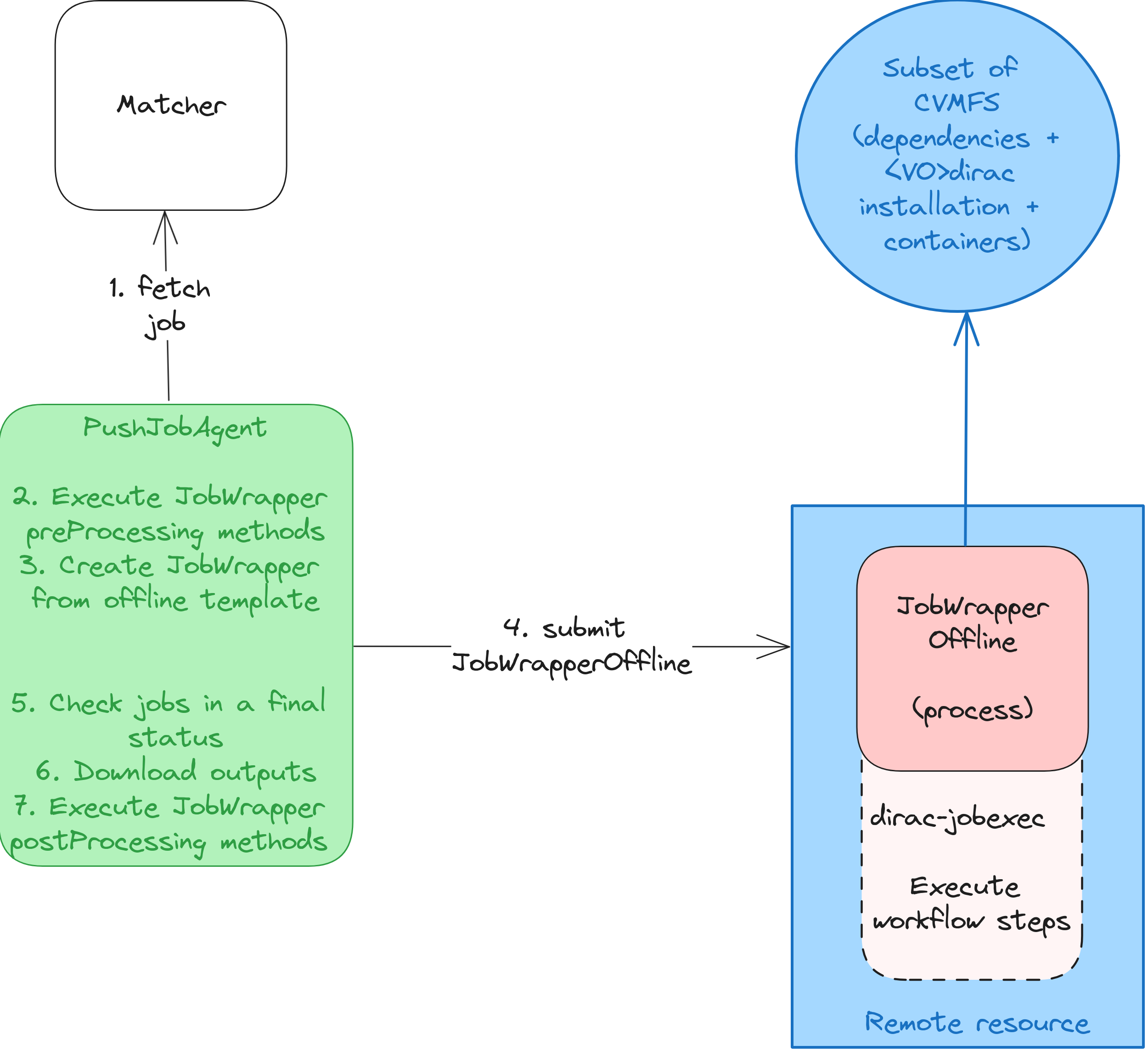
The JobWrapper mode is the default and recommended submission method, due to its reliability and efficiency. The workflow for this mode includes:
Job Retrieval: Fetch a job from the
MatcherHandlerservice.Pre-processing: Pre-process the job by fetching the input sandbox and any necessary data.
Template Generation: Create a
JobWrapperOfflineTemplatedesigned to execute the job’s payload.Submission: Submit the generated JobWrapperOfflineTemplate along with the inputs to the target Computing Element (CE).
Monitoring: Continuously monitor the status of the submitted jobs until they are completed.
Output Retrieval: Retrieve the outputs of the finished jobs from the target CE.
Post-processing: Conduct any necessary post-processing of the outputs.
Certainly! Here’s an enhanced version of the reStructuredText (reST) content:
Warning
The JobWrapper mode assumes that the job can execute without external connectivity. As an administrator, if any step of your job workflow requires external connectivity, it is crucial to review and adjust your logic accordingly. The JobExecutionCoordinator can assist in this process. It enables you to define custom pre-processing and post-processing logic based on specific job and CE attributes. For more detailed information, refer to the JobExecutionCoordinator documentation.
Application Mode (Deprecated)
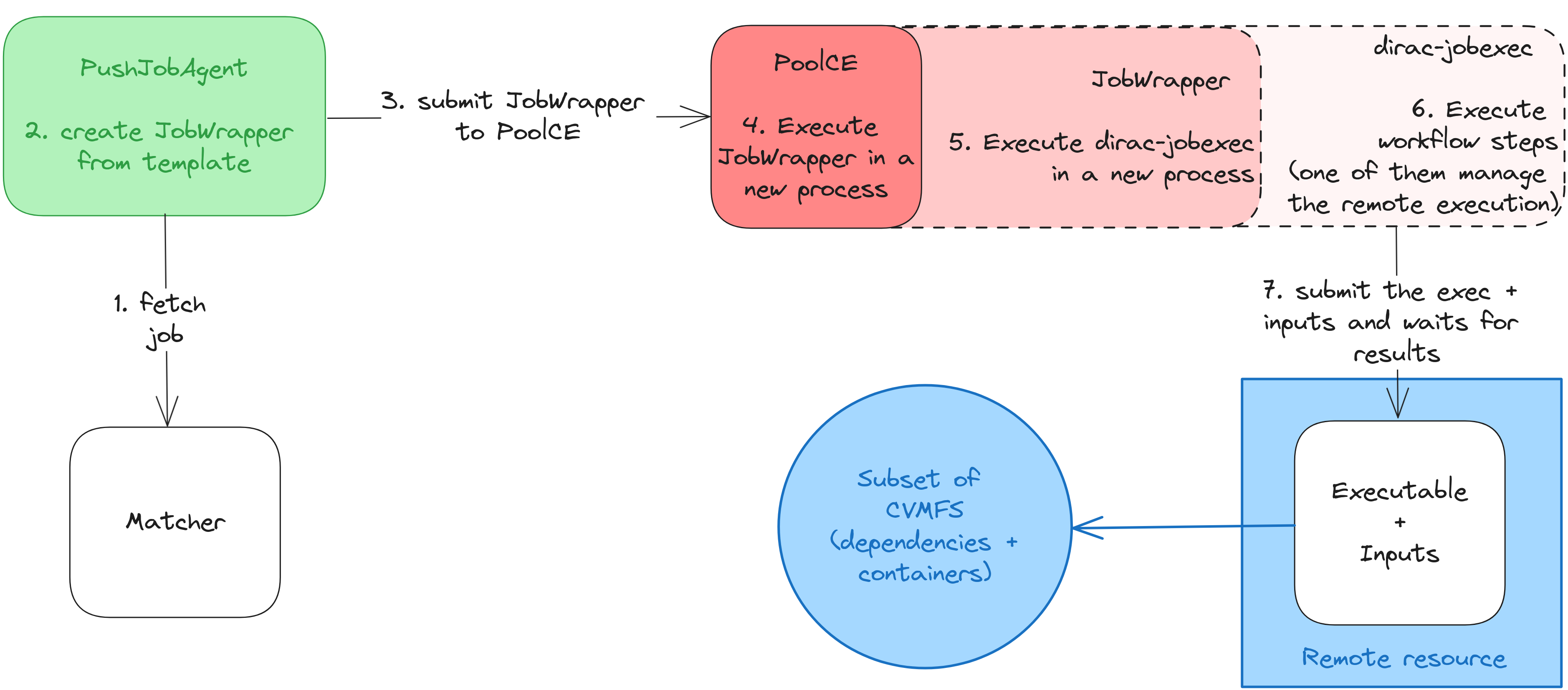
The Application mode is deprecated and slated for removal in future versions. It is considered less reliable due to higher memory consumption and sensitivity to CE-related issues, which restrict the number of jobs that can be processed concurrently. The workflow for this mode is as follows:
Job Retrieval: Fetch a job from the
MatcherHandlerservice using the target CE attributes.Template Generation: Generate a
JobWrapperTemplate.Submission: Submit the generated JobWrapperTemplate to a
PoolComputingElement. - The submission includes an additional parameter in/LocalSitenamedRemoteExecution, used to identify computing resources lacking external connectivity. - TheMaxJobsToSubmitsetting defines the maximum number of jobs the agent can handle simultaneously.Execution: The
PoolComputingElementexecutes the JobWrapperTemplate in a new process.Script Execution: Within this context, the JobWrapperTemplate can only execute the
dirac_jobexecscript in a new process.Workflow Module Processing: Workflow modules responsible for script or application execution (
Script) determine whether the payload needs to be offloaded to a remote location.Remote Execution:
RemoteRunnerchecks for the environment variable initialized by the JobWrapper. - If the variable is unset, the application runs locally viasystemCall(); otherwise, it is submitted to a remote CE such as ARC. - RemoteRunner wraps the script or application command in an executable, gathers input files from the working directory, and submits these along with the executable to the remote CE. - The status of the submitted application is monitored every 2 minutes until completion, after which the outputs are retrieved.
Warning
If the PushJobAgent is interrupted while processing jobs, administrators must manually clean up input directories (usually located at /opt/dirac/runit/WorkloadManagement/PushJobAgent/<JobID>) and terminate any associated processes (e.g., dirac-jobexec).
Multi-core/node allocations
This case has not been addressed yet.
CVMFS not available
Workloads depending on CVMFS cannot run on such infrastructure: the only possibility is to generate a subset of CVMFS, deploy it on the supercomputer, and mount it to a container. subCVMFS-builder and subCVMFS-builder-pipeline are two projects aiming to assist VOs in this process. They allow to trace applications of interest, build a subset of CVMFS, test it and deploy it to a remote location.
To integrate the subset of CVMFS with the DIRAC workflow, one can leverage the ARCComputingElement XRSLExtraString option such as:
XRSLExtraString = (runtimeEnvironment="ENV/SINGULARITY" "</path/to/singularity_container>" "" "</path/to/singularity_executable")
To mount the subset of CVMFS in the singularity container, one has to contact the ARC administrators to finetune the configuration or has to build a container image containing the subset with subCVMFS-builder.
LRMS not accessible
In this case, nothing can be done.